Professional EV Diagnostic Battery Tester Upgrade Kit LAUNCH X431 EV DIAGKIT with Activation Card for PAD V / PAD VII

Product Description

LAUNCH X431 EV Diagnostic Upgrade Kit + Activation Card
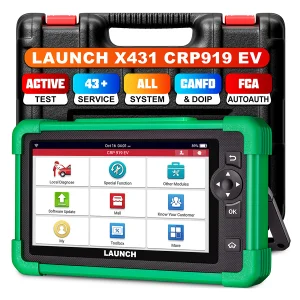
Compatible with X431 PAD V & PAD VII
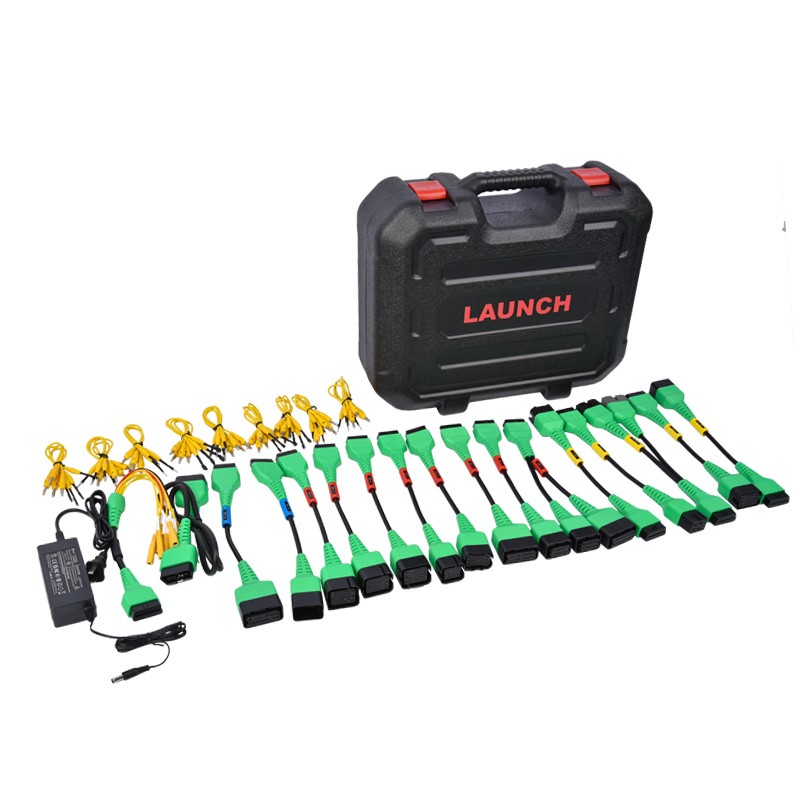
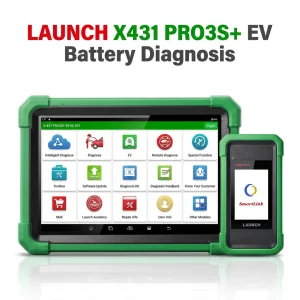
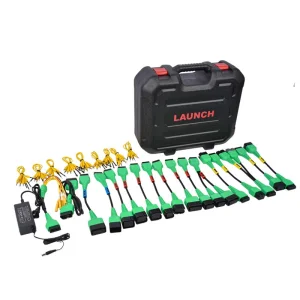
The Launch X431 new energy battery Diagnostics Upgrade Kit includes activation card and adapters for specific electric vehicles to perform battery pack analysis.
The battery package is compatible with the X431 PAD V and PAD VII. Use the Launch EV Diag Upgrade Kit (EV DIAGKIT) to diagnose battery pack State of Charge and State of Health on Tesla, BYD and many other electric vehicles.
How to Use It
Prerequisites:
User has already purchased new energy battery pack diagnostic configuration of the X-431 PAD V/X-431 PAD VII from the seller and received the Activation Card of new energy detection expansion package and diagnostic adaptor cables.
Method 1 - Via Job Menu
1Update Main Diagnostic App
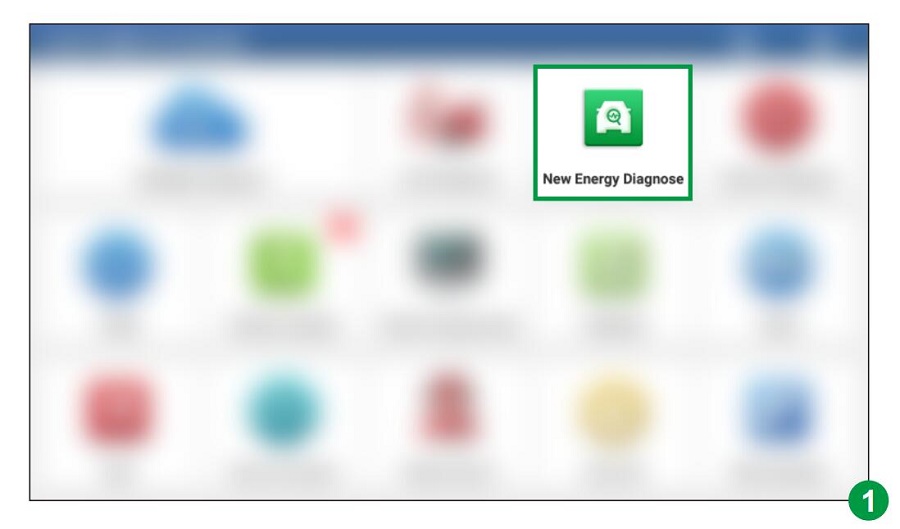
Update the main diagnostic app of the diagnostic scanner to V7.03.025 (X-431 PAD V) / V7.00.021 (X-431 PAD VII) or above and a new module "New Energy Diagnose" will appear on the Job menu. Refer to figure 1.
Figure 1
2Enter Diagnostic Screen
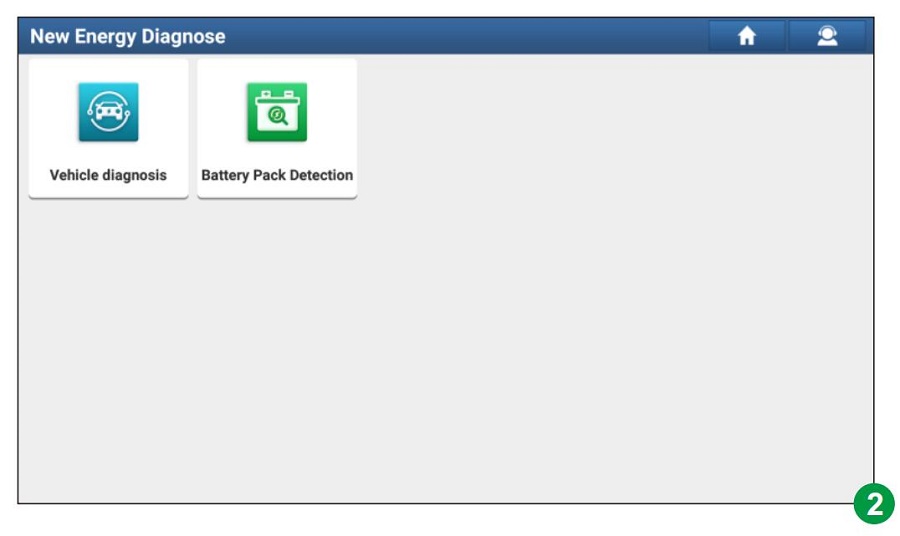
Tap New Energy Diagnose to enter the following screen. Refer to figure 2.
Figure 2
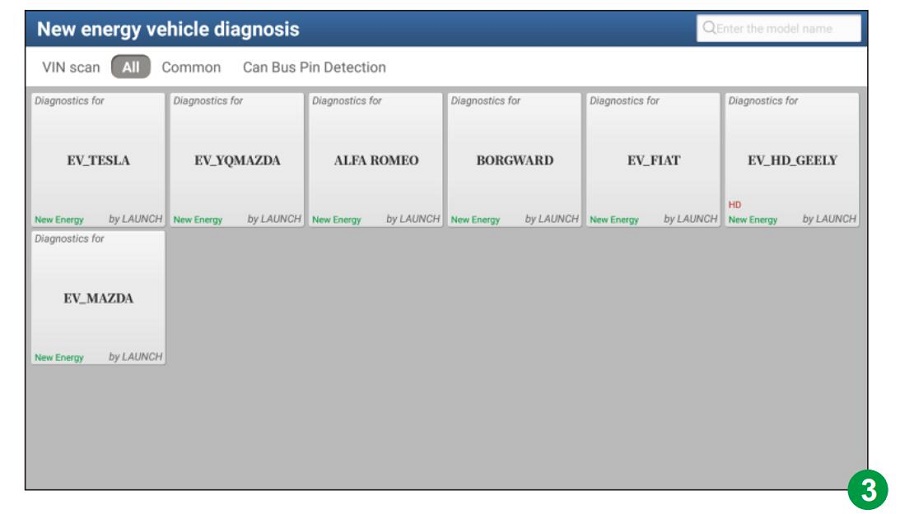
*Note: Vehicle Diagnosis in figure 2 covers all new energy vehicle diagnostic software included in the original product configuration. See figure 3.
Figure 3
3Verify Activation Status
Tap Battery Pack Detection, the system will identify whether the current user account has activated the battery pack diagnostic configuration or not.
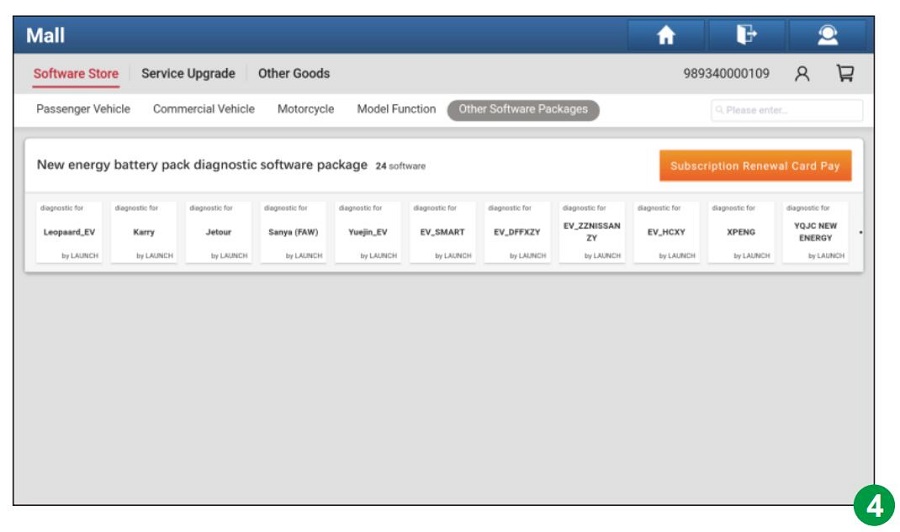
A. If not activated: It will navigate to the Mall module directly. See figure 4. Tap Subscription Renewal Card Pay and enter the 24-digit password to activate it. After it is successfully activated, please go to Software Update to download and install the diagnostic software of the battery pack.
Figure 4
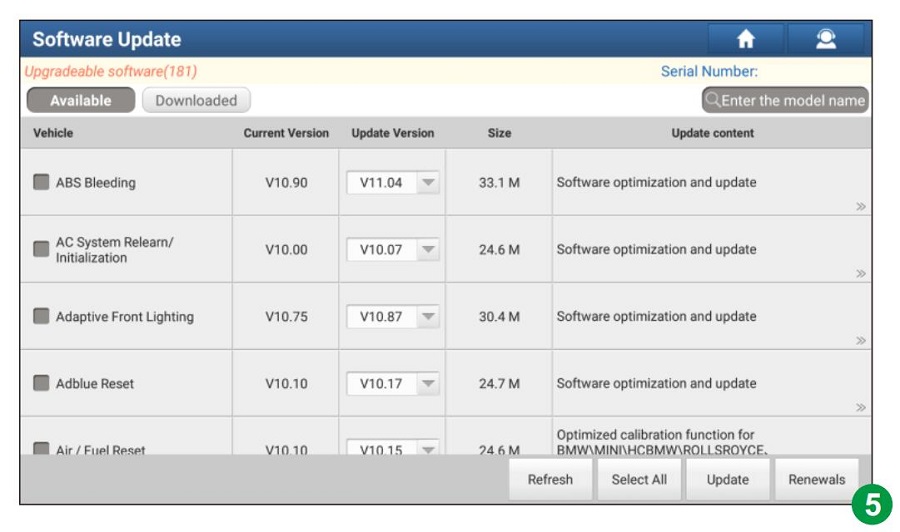
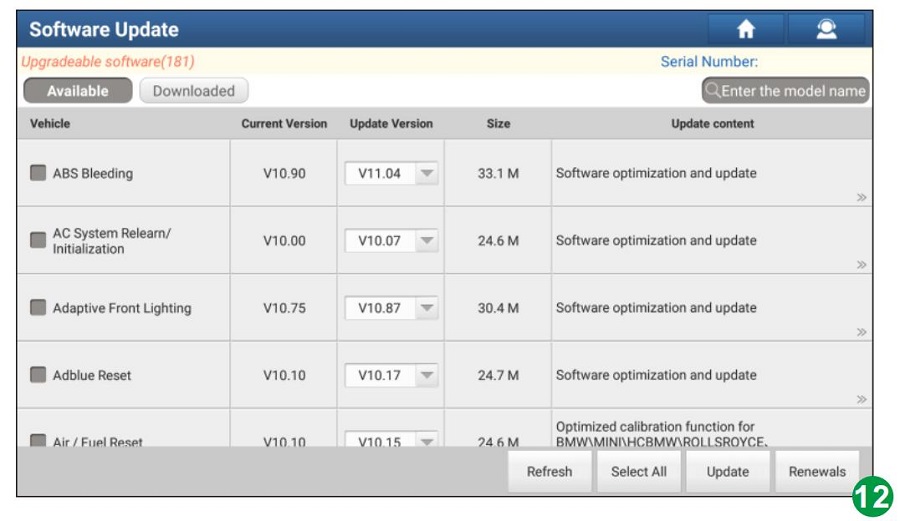
B. If already activated but not downloaded: It will go to Software Update to download. See figure 5.
Figure 5
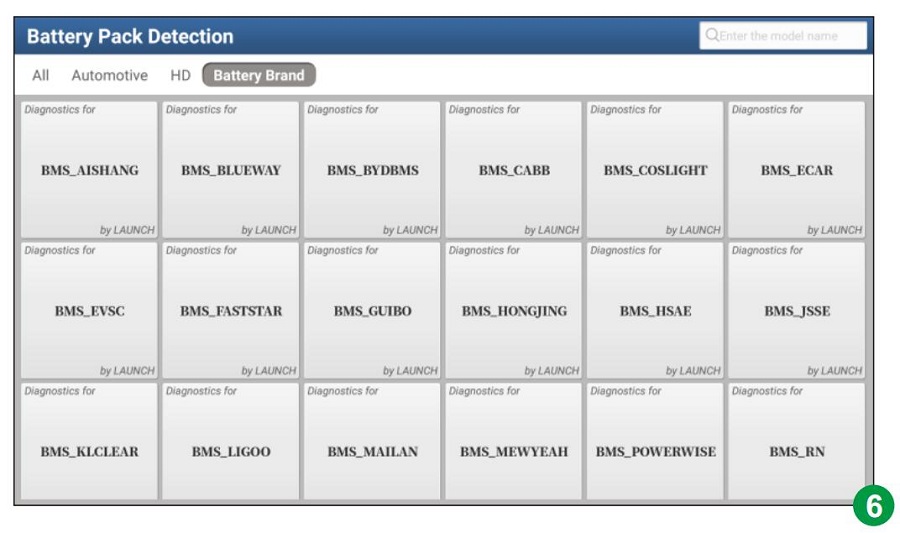
C. If already activated and downloaded: It will enter the battery pack brand selection screen. See figure 6.
Figure 6
Method 2 - Via Mall
1Access Mall Menu
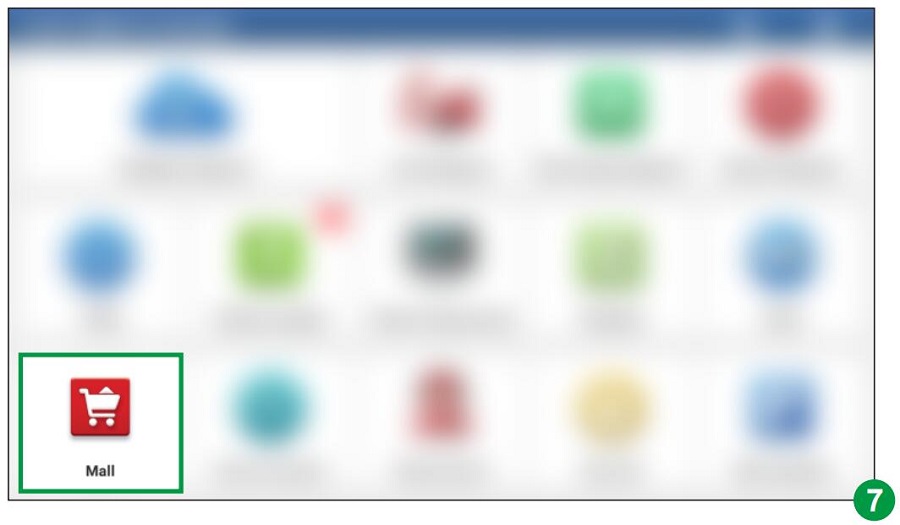
Update the main diagnostic app of the diagnostic scanner to V7.03.025 or above and tap Mall on the Job menu. See figure 7.
Figure 7
2Select Package
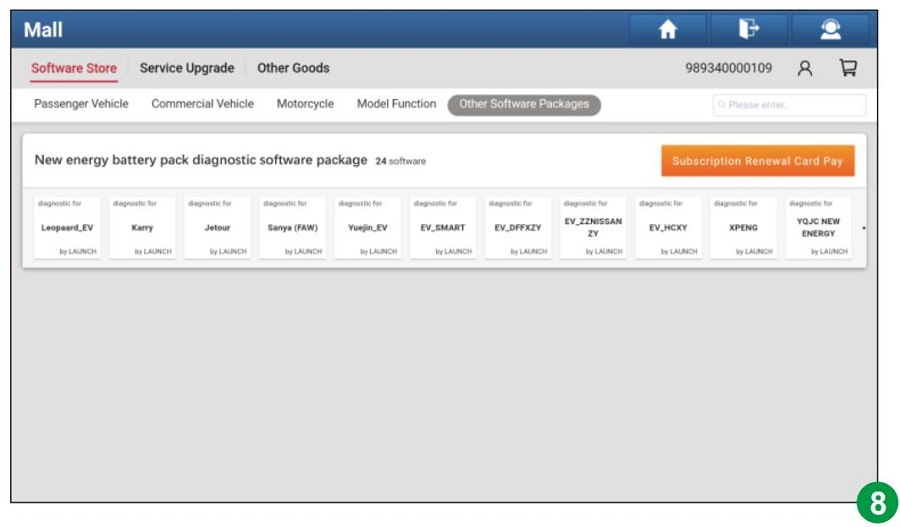
Tap Other Software Packages, and then tap New energy battery pack diagnostic software package to enter figure 8.
Figure 8
3Initiate Payment
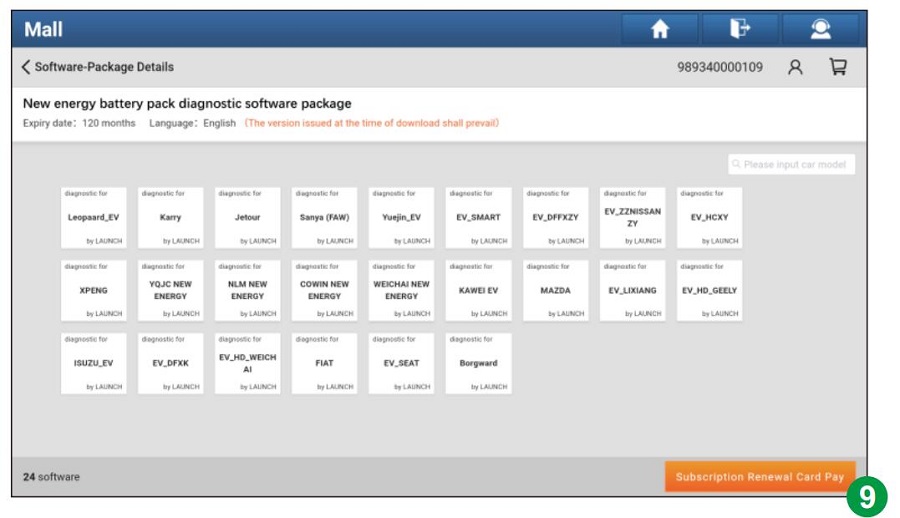
Tap Subscription Renewal Card Pay to enter figure 9.
Figure 9
4Enter Code & Activate
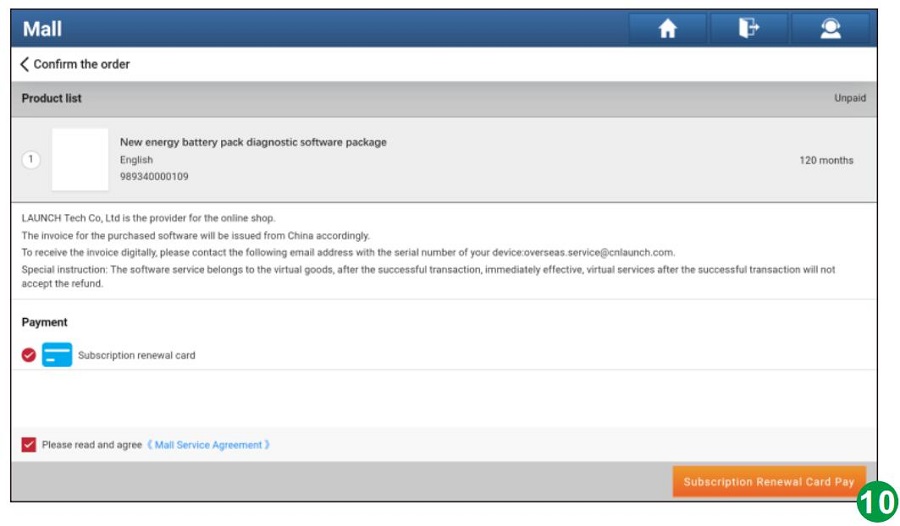
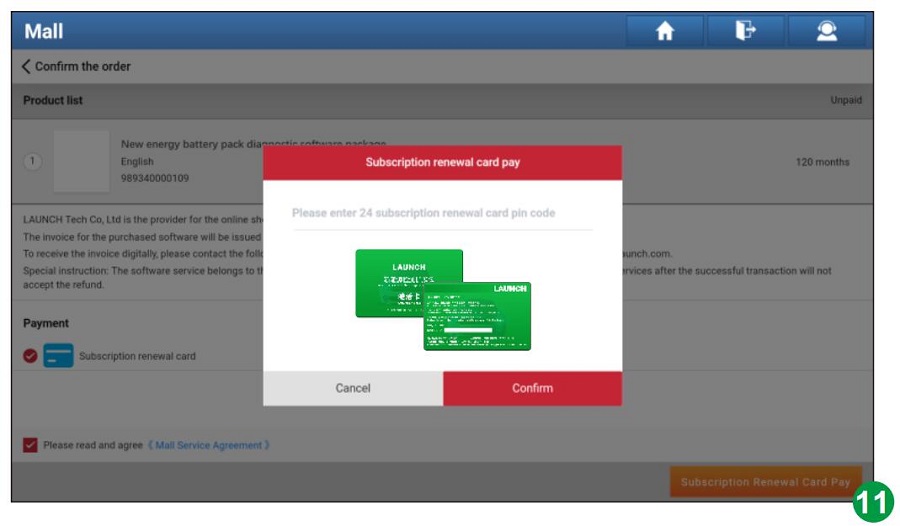
Tap Subscription Renewal Card Pay, enter the 24-digit password and tap Confirm to activate it. See figure 10 & 11.
Figure 10
Figure 11
5Install Diagnostic Software
After it is successfully activated, please go to Software Update to download and install the diagnostic software of the battery pack. See figure 12.
Figure 12
6Run Detection
After downloading is completed, tap New Energy Diagnose and then tap Battery Pack Detection. The system will enter the battery pack brand selection screen. See figure 6.
*Note: All illustrations and descriptions in this operation instruction are based on the latest information available at the time of publication. Due to continuing improvements, actual product may differ slightly from the product described herein.
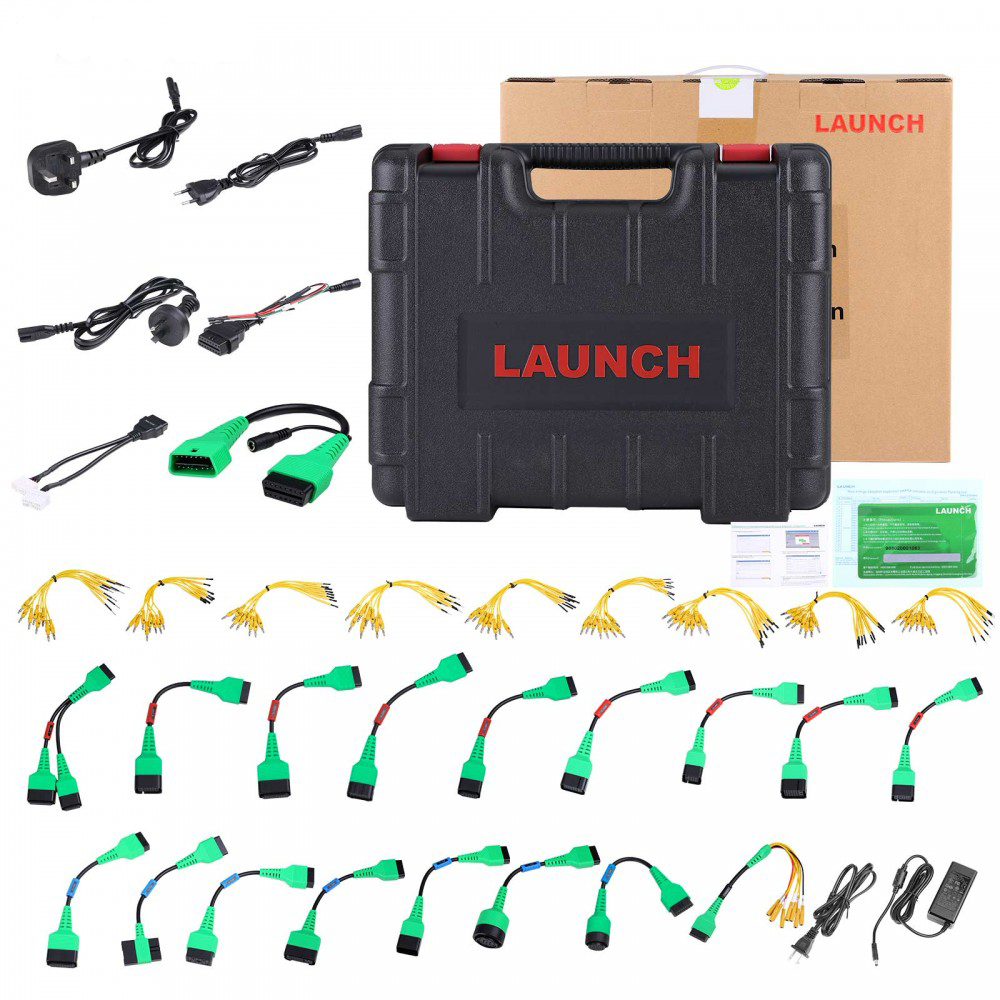
📦 Package Includes
1pc x Tesla-12+20 connector, RoHS
1pc x Special connector for Tesla airbag repair, RoHS
1pc x (PAD VII) 220V/1.3A, 8-suffix British AC wire, 1M, Pengshengye, RoHS
1pc x OBD16 male to female new energy extension cable, with DC cable, RoHS
1pc x X431 EV MAX battery pack detection 8PIN diagnostic connector, RoHS
1pc x X-431 PAD IV electric control adapter cable 1, RoHS
1pc x X-431 PAD IV electric control adapter cable 10, RoHS
1pc x X-431 PAD IV electric control adapter cable 11, RoHS
1pc x X-431 PAD IV electric control adapter cable 12, RoHS
1pc x X-431 PAD IV electric control adapter cable 2, RoHS
1pc x X-431 PAD IV electric control adapter cable 3, RoHS
1pc x X-431 PAD IV electric control adapter cable 6, RoHS
1pc x X-431 PAD IV electric control adapter cable 7, RoHS
1pc x X-431 PAD IV electric control adapter cable 8, RoHS
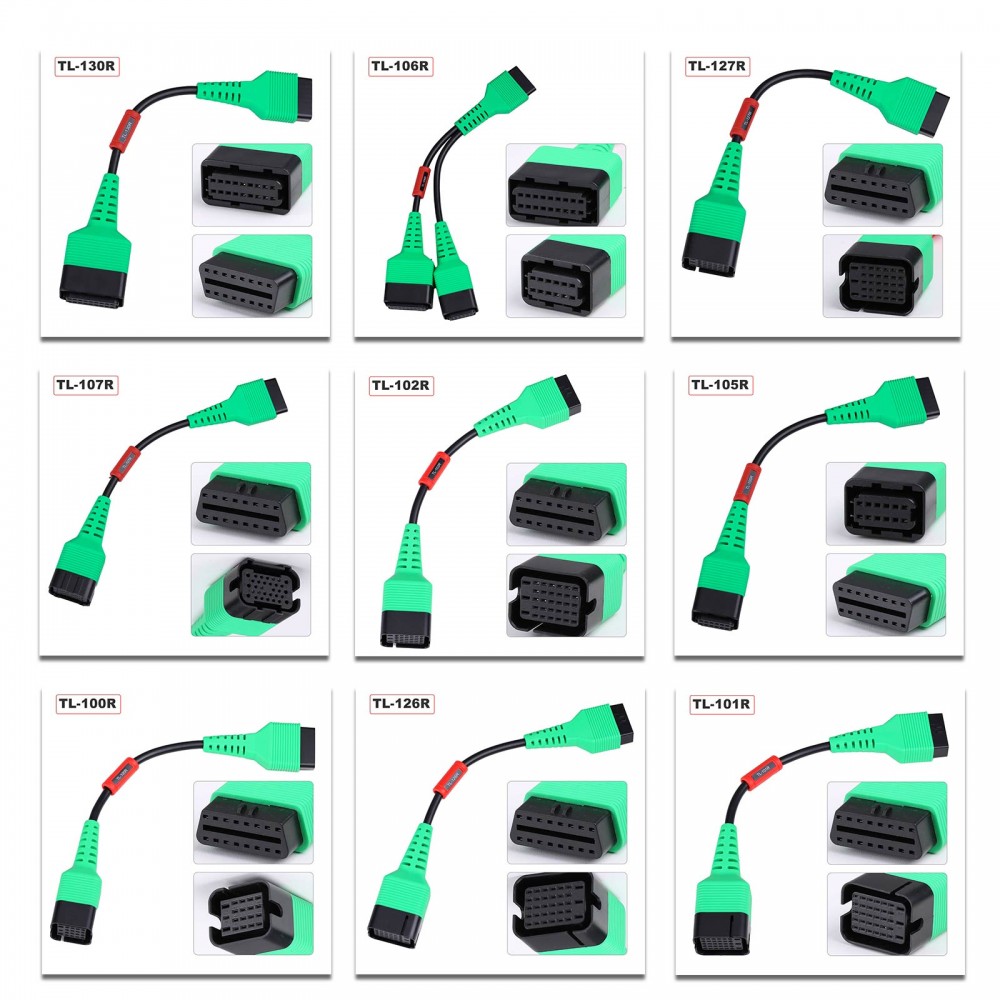
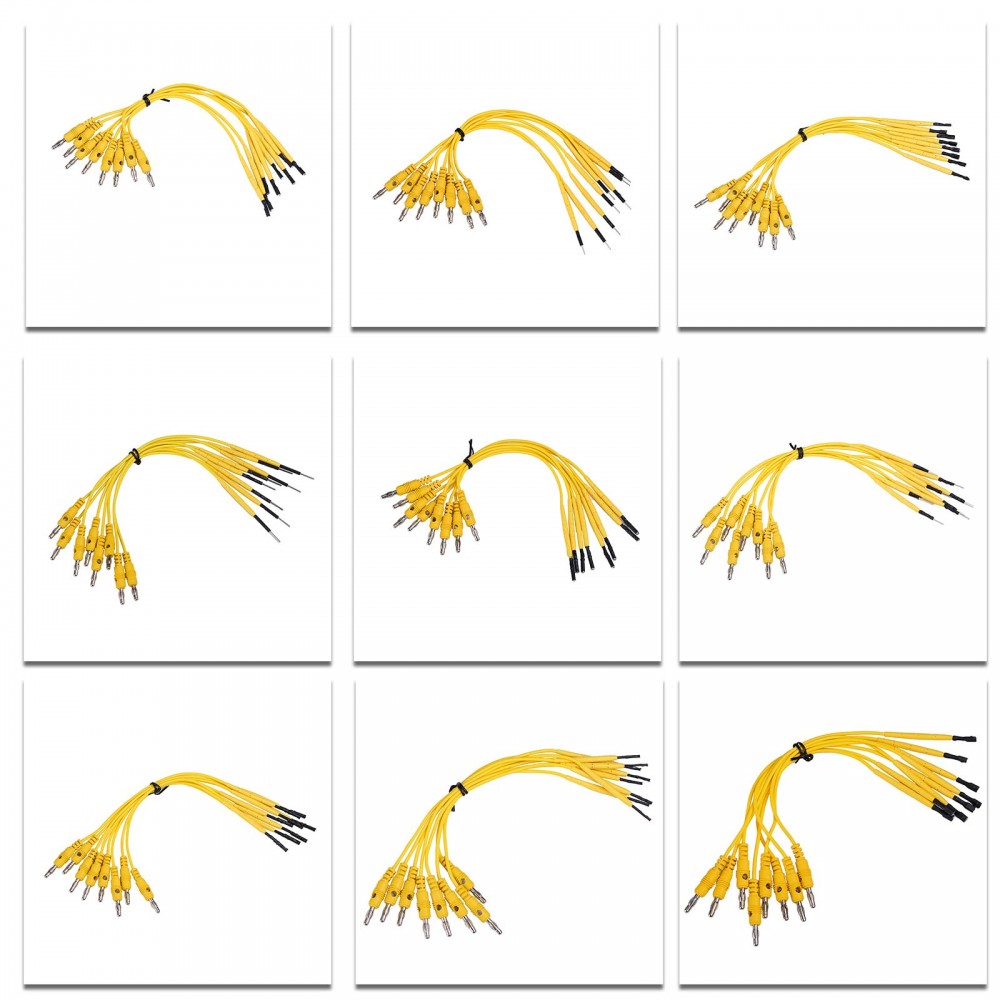
1pc x Battery pack test line 100 models, RoHS
1pc x Battery pack test line 101, RoHS
1pc x Battery pack test line 102, RoHS
1pc x Battery pack test line 103, RoHS
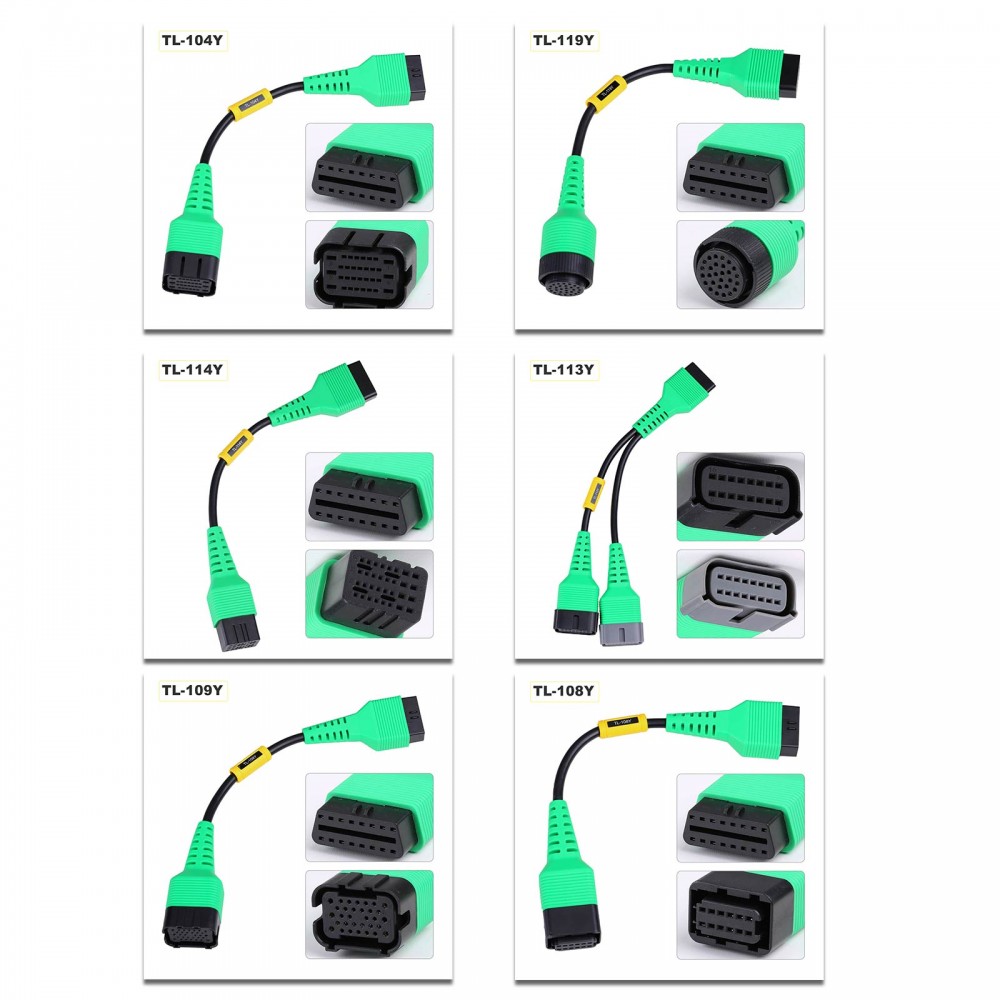
1pc x Battery pack test line 104, RoHS
1pc x Battery pack test line 105, RoHS
1pc x Battery pack test line 106, RoHS
1pc x Battery pack test line 107, RoHS
1pc x Battery pack test line 108, RoHS
1pc x Battery pack test line 109, RoHS
1pc x Battery pack test line 110 models, RoHS
1pc x Battery pack test line 112 models, RoHS
1pc x Battery pack test line 113, RoHS
1pc x Battery pack test line 114, RoHS
1pc x Battery pack test line 115 models, RoHS
1pc x Battery pack test line 116, RoHS
1pc x Battery pack test line 119, RoHS
1pc x Battery pack test line 124 types, RoHS
1pc x Battery pack test line 126 models, RoHS
1pc x Battery pack test line 127 models, RoHS
1pc x Battery pack test line 130 models, RoHS
1pc x Battery pack test line 152 models, RoHS
1pc x (PAD VII), 8-suffix Australian standard AC wire, 1M, Pengshengye, RoHS
1pc x (PAD VII) 220V/1.3A, 8-suffix European standard AC wire, 1M, Pengshengye, RoHS
1pc x Power adapter, 12V4A, 48W desktop, 8-suffix DC connector 5.5, US standard AC cable, 2M, Pengshengye, RoHS
1pc x New Energy Detection Extension Pack Overseas Configuration Operation Guide, RoHS
1pc x Activation Card
Frequently Asked Questions
Q Which diagnostic tools are compatible with the EV Diagnostic Upgrade Kit?
The battery package is fully compatible with the X-431 PAD V and X-431 PAD VII diagnostic scanners.
Q What functions can this upgrade kit perform?
It allows you to perform detailed battery pack analysis, diagnosing the State of Charge (SoC) and State of Health (SoH) on Tesla, BYD, and many other electric vehicles.
Q What software version is required to access the "New Energy Diagnose" module?
The main diagnostic app on the scanner must be updated to V7.03.025 (for X-431 PAD V) or V7.00.021 (for X-431 PAD VII) or above.
Q How do I activate the subscription after purchasing?
You can navigate to the "Mall" section or access the module from the "Job Menu". Tap "Subscription Renewal Card Pay", then enter your 24-digit password on the activation card to activate.
Q Where do I download the EV battery pack software once activated?
After successful activation, go to the "Software Update" menu on your diagnostic scanner to download and install the new software.
Q Are specific Tesla diagnostic connectors included in the package?
Yes, the package includes a Tesla-12+20 connector and a special connector specifically designed for Tesla airbag repair.

Related Products